Version 8.1.1 · Free start · Premium unlock

A private PDF toolkit
for serious Mac workflows.

Compress, sign, protect, repair, merge, split, and extract PDFs locally on your Mac. GhostPDF+ keeps document work fast, private, and organized without a subscription.

Local processing, no uploads
Certificate PDF signing
Compression and PDF/A repair
Image and vector extraction

No subscription. Existing paid App Store customers keep unlimited access.

GhostPDF App Interface

Free Start

$0

Download GhostPDF+ from the Mac App Store and complete two successful PDF operations.

  • ✓ Compression, tools, security, and advanced workflows available
  • ✓ Free operations count only after successful exports
  • ✓ No account, no uploads, no subscription

Premium

$7.99 one time

Unlock unlimited local processing with a lifetime in-app purchase.

  • ✓ Unlimited successful operations
  • ✓ Restore purchases anytime through Apple
  • ✓ Early paid App Store customers are grandfathered in

Why GhostPDF?

Built for researchers, professionals, and anyone who cares about privacy.

PR

100% Offline

Your files never leave your Mac. No uploads, no cloud processing, no tracking. Perfect for sensitive documents.

QC

Quality Controls

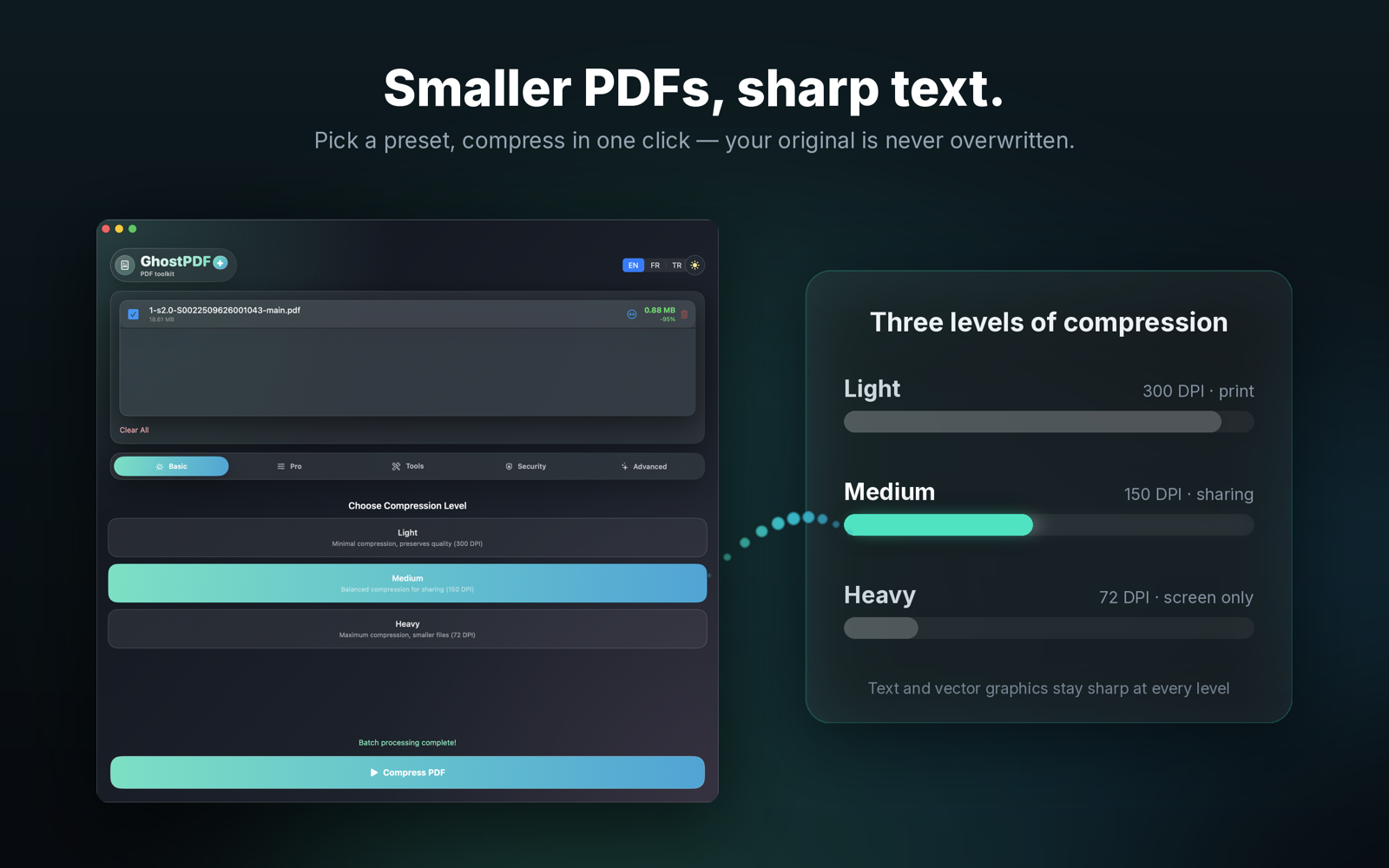
Balance file size and clarity with practical presets, DPI choices, grayscale conversion, and metadata handling for everyday PDF workflows.

PW

Password Support

Seamlessly handles password-protected PDFs. The app prompts for passwords when needed, supporting batch processing of encrypted documents.

UX

Simple & Powerful

One-click presets for quick compression. Pro mode for fine-tuned control. Drag, drop, done.

CK

Selective Processing

Choose exactly which files to process with checkboxes. Skip files, delete individuals, and compress only what you need.

BT

Batch Processing

Process hundreds of files at once. Real-time progress tracking for every file in your batch.

UL

Decrypt & Unlock

Forgot a password? Need to edit a restricted file? Instantly remove owner passwords and unlock full access to your documents.

FX

PDF Repair

Automatic recovery for corrupted or damaged PDFs. Rebuilds file structures to salvage unreadable documents.

PG

Drag & Drop Reordering

The new Drag-and-Drop interface makes organizing pages effortless. Easily reorder pages to structure your document exactly how you need.

Pro Features

Advanced controls for professionals who need precise output.

Color Management

Convert to Grayscale or Monochrome. Set custom DPI for color, gray, and mono images independently.

Font Optimization

Subsetting embeds only used characters to save space. Option to fully embed or compress fonts.

Advanced Options

Remove metadata, detect duplicate images, and use ASCII85 encoding for compatibility.

More Than Just Compression

Powerful tools included with GhostPDF.

Security Suite

EN

Encrypt PDF

Password-protect PDFs with industry-standard encryption. Control printing and copying.

Protection
DE

Decrypt PDF

Remove passwords from protected files instantly (password required). Unlocks full access.

Unlock
WM

Add Watermark

Apply custom text watermarks. Control opacity, rotation, and placement for branding.

Branding

PDF Signing

Sign PDFs with certificates, then verify them in Acrobat Reader.

GhostPDF+ supports real digital signatures with .p12 and .pfx certificate files. Add an invisible signature for document integrity, or place a visible signature block on the first page, last page, or a custom page position.

Digital signature

Cryptographically seals the PDF. Acrobat can report whether the document has changed after signing.

Visual signature

Adds typed text, an image, or handwriting to the page. It is visual only unless you also use certificate signing.

What to look for in Acrobat Reader

  • Open the signed PDF and click Signature Panel if Acrobat shows it.
  • Expand the signature entry in the right panel.
  • The key integrity message is: Document has not been modified since this signature was applied.
1. Choose certificate Select your .p12 or .pfx file and enter its password.
2. Pick visibility Sign invisibly, or add a visible signature block on the page.
3. Verify Use Acrobat Reader's Signatures panel to confirm document integrity.

Page Management

MR

Merge PDFs

Combine multiple files into one document. Perfect for reports and compilations.

Combine
PG

Reorder Pages

Drag-and-drop page manipulation. Easily rearrange pages to structure your document.

Visual
SP

Split & Extract

Split files apart or extract specific pages (e.g., '1, 3, 5') into new documents.

Selection

Content Tools

RT

Rotate & Delete

Quick select buttons for Odd/Even/All pages. Fix orientation or remove unwanted pages instantly.

Quick Select
A4

Resize to A4

Standardize mixed-size documents. Scales all pages to fit standard A4 paper size.

Format
RS

PDF Rasterizer

Convert pages to flat images. Prevents copying/editing of text and vectors.

Security

Advanced & Extraction

VX

Vector Drawing Extraction NEW

Automatically detect and extract vector figures, charts, and diagrams from academic papers and technical PDFs. Intelligently groups multi-panel figures, handles dual-column layouts, and exports clean, high-resolution PNGs.

Premium
EX

Professional Image Extraction

Extract original, full-resolution images from any PDF in their native formats (JPEG, PNG, TIFF). Fully supports complex color workflows, including CMYK, ICCBased, and Indexed color spaces, ensuring zero quality loss.

Professional
FX

PDF Repair

Rebuild corrupted file structures. Salvage unreadable PDFs automatically.

Recovery
PA

Convert to PDF/A

Archival standard (PDF/A-2b). Ensure long-term preservation and compliance.

ISO Standard

Free Download, Lifetime Unlock

GhostPDF+ now ships through the Mac App Store. Start for free, then unlock unlimited use with Premium when you need more.

Free

$0

Includes two successful PDF operations. Failed operations do not consume the free quota.

Premium

$7.99 one time

Unlocks unlimited local PDF processing. Restore purchases anytime with your Apple ID.

Existing paid customers: If you bought GhostPDF+ before version 8, the app keeps unlimited access for you automatically.

PV

Private & Secure

GhostPDF+ processes your PDFs locally on your Mac. Your documents are not uploaded to a server, and Premium is handled through Apple's in-app purchase system.

Ready for private PDF workflows?

Free to download with two successful operations included. Unlock unlimited local PDF processing with one lifetime purchase.

Privacy Policy

Last updated: December 2025

GhostPDF is designed with privacy as a core principle. We do not collect, store, or transmit any user data.

Data Collection

This app collects no personal information. All PDF compression happens entirely on your device. Your files are never uploaded to any server.

Network Access

PDF processing runs locally and does not upload your documents. The Mac App Store version may contact Apple only for download, purchase, and restore-purchase workflows.

Third-Party Services

This app does not integrate with any third-party analytics, advertising, or tracking services.

Contact

If you have questions about this privacy policy, contact us at ou.salman@icloud.com
Support

Need help with GhostPDF? We're here to assist.

Contact

For bug reports, feature requests, or general questions, please email us at:

ou.salman@icloud.com

Common Issues

  • PDF not compressing: Some PDFs are already optimized and may not compress further.
  • Premium access: Use Restore Purchases in the app if Premium does not appear active after buying or reinstalling.
  • Free operations: The free quota includes two successful operations. Failed exports should not count against it.
  • Quality too low: Try a higher DPI setting in Pro Mode.

System Requirements

  • Mac App Store version: macOS 13.0+ (Ventura)
  • Premium: One-time in-app purchase, restorable through Apple