1
Prompt
"Join my clips into an App Store preview, resize for App Store Connect, add a named transition, and export one H.264 MP4."
 FLOW COMPRESSOR
AI Recipe turns plain-language requests into finished video workflows on your Mac. Create comparison grids, PNG movies, App Store previews, labels, crops, rotations, speed changes, visible transitions, and clean H.264 exports without building the command by hand.
FlowCompressor turns a plain request into a clear plan, then renders the final MP4 locally so you can understand the edit before committing to the export.
"Join my clips into an App Store preview, resize for App Store Connect, add a named transition, and export one H.264 MP4."
A single local video export, ready to preview before sharing or submitting.
Type the result you want and FlowCompressor translates it into a reviewable recipe before running the export. It is built for practical work: grids, previews, image sequences, labels, resizing, cropping, rotation, audio handling, and quality settings.
Create 1x2, 2x2, or 1x4 layouts with fit or fill modes, filename labels, and clean H.264 output.
Turn selected PNG sequences into fast MP4 slideshows in filename order, with full-image fit and black canvas padding.
Prepare App Store-style clips, resize to target dimensions, add silent stereo audio when needed, and keep exports submission-ready.
Slow down or speed up source-time ranges, add visible transition effects at speed-change points, and merge clips with named transitions.
Describe a video task in plain language and review the generated plan before export. FlowCompressor can build grids, PNG movies, labels, crops, rotations, previews, and quality presets from one prompt.
Use a pure Apple AVFoundation pipeline for compatible files. Apple Native compression keeps the workflow close to macOS, with preflight checks, reliable fallback guidance, and efficient local exports.
Don’t waste time compressing videos one by one. Drag and drop dozens of files—from 4K drone footage to mobile captures—and let FlowCompressor handle the heavy lifting. Our optimized engine handles multiple concurrent compressions to maximize your Mac’s performance without slowing down your workflow.
Combine multiple clips into a single polished video. Drop your files, choose Hard Cut for instant transitions, Crossfade for smooth blends, or AI Recipe named transitions such as wipes and circle opens, and export a merged 1080p MP4 in seconds. Mixed audio tracks are handled automatically — no manual editing required.
Submit perfect previews without the guesswork. FlowCompressor auto-configures encoding for App Store Connect — crop to the first 30 seconds or speed up your full video to fit, with silent audio fixed automatically.
Stop guessing dimensions. Select your target device — Mac, iPhone, or iPad — and pick the exact App Store Connect resolution. FlowCompressor automatically scales, letterboxes, and pillarboxes your video to pixel-perfect dimensions in a single pass alongside your trim and audio fix.
Harness the full power of Apple Silicon's dedicated Media Engine. Toggle GPU mode to dramatically accelerate encoding using Apple's VideoToolbox hardware encoder. Get the same output in a fraction of the time, with minimal CPU usage and battery drain.
We believe in "distillation," not degradation. FlowCompressor uses high-efficiency encoding with visually lossless presets. Keep your 4K resolution and sharp details while reducing file sizes by up to 90%. No downscaling, no artifacts, just smaller files.
Designed for the modern Mac, FlowCompressor features a premium glassmorphic aesthetic that feels right at home on current macOS versions. It is fully optimized for Apple Silicon, ensuring the fastest possible render times with minimal battery drain.
Choose Standard FFmpeg, GPU Hardware, or Apple Native depending on the job and source media.
Compatible files are checked before export so unreadable media gets clear fallback guidance.
Import and process entire folders of videos without leaving the app.
All processing happens 100% locally on your machine. Your data never leaves your Mac.
Choose Small, Balanced, High, or maximum-quality workflows from the app or AI Recipe.
Works perfectly with MP4, MOV, M4V, MKV, AVI, and professional MXF files.
Create fast H.264 movies from large PNG image sequences in filename order.
One-click scaling to exact App Store Connect dimensions for Mac, iPhone, and iPad.
FlowCompressor includes 3 free exports. Premium is a lifetime unlock for unlimited compression, App Store preview, merger, and AI Recipe exports.
Free
Try the full workflow with 3 exports included.
Premium
One lifetime purchase for unlimited local video exports.
Preview Apple Native compression, App Store-ready exports, and real AI Recipe outputs with the prompts that created them.
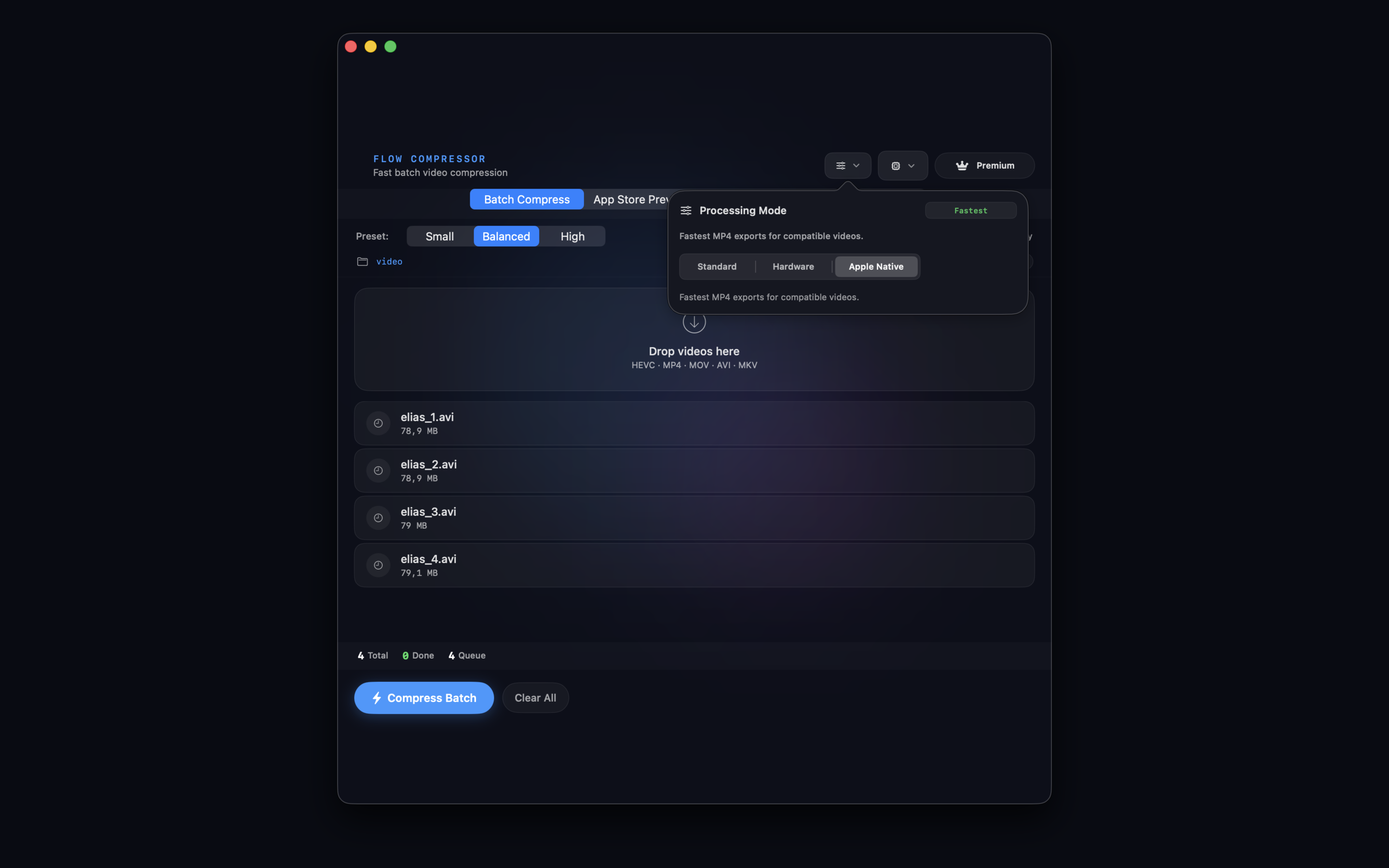
Apple Native Mode
FlowCompressor can use Apple AVFoundation and VideoToolbox for local, hardware-aware compression with clear fallback guidance for files that need the standard engine.
Prompt
"Take the selected PNG images and create a fast MP4 slideshow. Show each image for 0.1 seconds in filename order. Fit each image inside a 1920x1080 canvas with a black background so the full image remains visible. Export as a 1920x1080 H.264 MP4 with high quality."
Prompt
"Take my 4 selected videos and create a 2x2 grid comparison. Fit each full video inside its grid cell without cropping. Add large white labels "A", "B", "C", and "D" at the top center of each grid cell. Use font size 48. Slowdown the video total duration 20 seconds. Export as a 1920x1080 H.264 MP4."
Need help? Contact us at ou.salman@icloud.com. We are available to assist with any technical issues or feature requests.
FlowCompressor is built with privacy in mind. All video processing is performed 100% locally on your machine. Your data never leaves your Mac. We do not collect, store, or share your personal data or video content.