01
Drop in your PDFs
Add research papers, books, contracts, invoices, IDs, medical documents, tickets, and more.
🎉 Launch offer: first year of Pro free with code FREEYEAR · until Aug 31
Claim free year
Ask your library.
Follow the evidence.
CleverGhost 8 combines meaning-aware and exact-term search to find stronger evidence, keep natural follow-up questions grounded in the right document, and answer across research papers or personal PDFs.
$12.99/year after trial, or $39.99 once for lifetime access.
First year of Pro free with code FREEYEAR until Aug 31.
Claim free yearOne home for every PDF
CleverGhost is not just a PDF viewer or a chat box. It builds a private document library, understands what each file contains, and gives you practical ways to use that knowledge.
01
Add research papers, books, contracts, invoices, IDs, medical documents, tickets, and more.
02
It extracts titles, authors, dates, document types, and useful details, then organizes everything automatically.
03
Search by meaning and exact terms, ask natural follow-ups, compare papers, create citations, compress files, and clean up duplicates.
A practical alternative
If your reference manager stops at citations, CleverGhost adds the missing PDF layer: private Smart Library organization, AI search, full-reference extraction, BibTeX export, and practical PDF tools without forcing your library into the cloud.
Paperpile-style cloud libraries
Keep your PDF library private on your Mac, with optional cloud AI only when you choose it.
Zotero-only organization
Use Smart Library drawers, semantic search, duplicate detection, and Ask Library on top of citation workflows.
BibDesk-only BibTeX editing
Extract full bibliographies from papers and theses, verify metadata, then export clean BibTeX.
Separate PDF utilities
Compress, OCR, extract, cite, compare, rename, and manage PDFs in one toolkit.
Version 8.0.0
CleverGhost now retrieves evidence in two complementary ways: semantic search understands what you mean, while lexical search preserves exact names, equations, dates, and technical terms. Stable fusion brings the strongest passages together before Gemini or your selected local model answers.
⌁
Meaning-aware and exact-term searches run independently, then combine into one reliable evidence set.
↳
Ask about “this paper,” a previous answer, or an unfamiliar term without restarting the conversation.
§
Retrieve from methods, theory, equations, metadata, and document content instead of stopping at the abstract.
⌂
Ask for details in passports, IDs, bills, invoices, and statements when you choose those documents.
New in CleverGhost 8
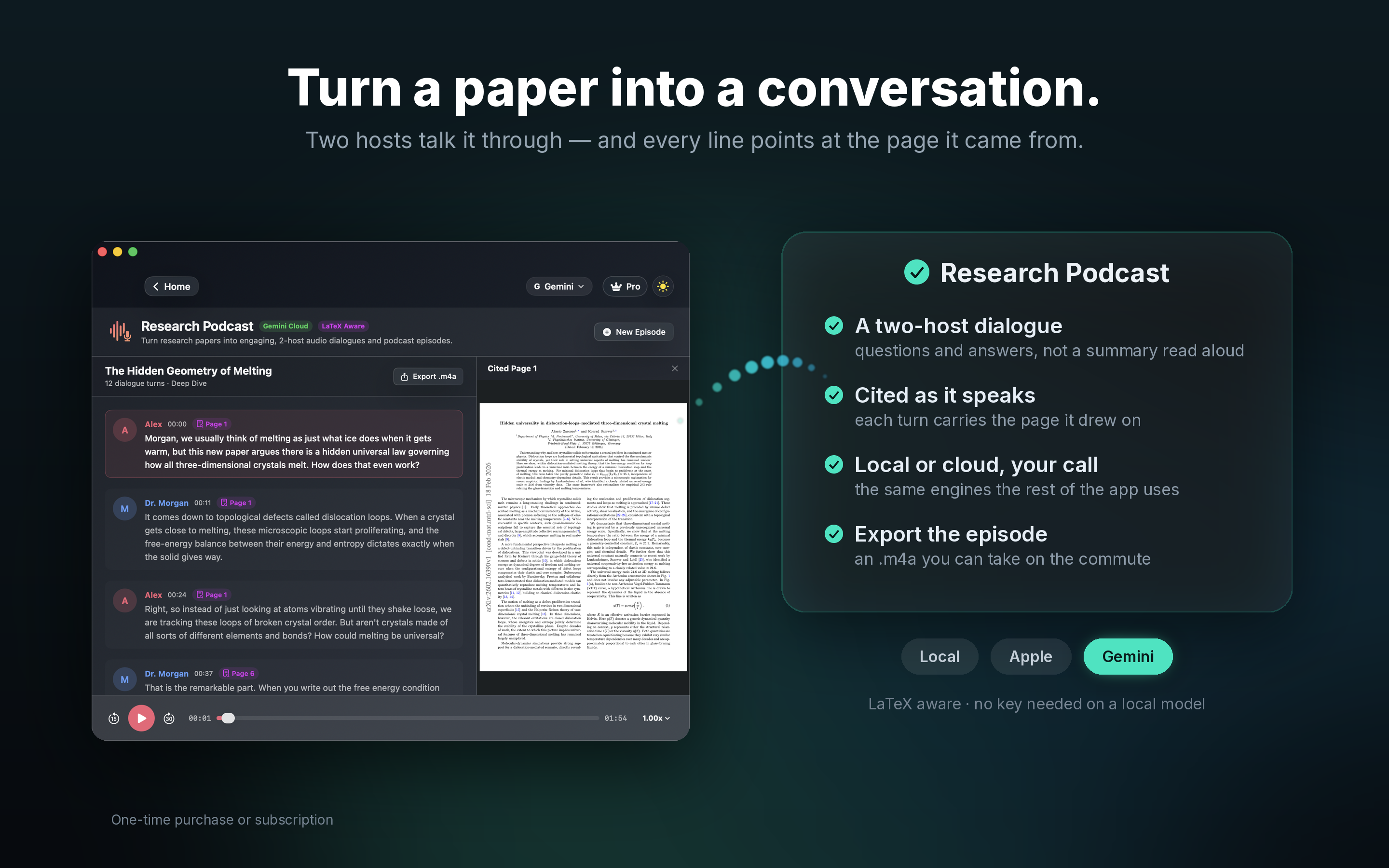
Research Podcast transforms selected papers into an engaging two-host dialogue. Choose the episode length, select your preferred AI and document-reading engine, then listen while CleverGhost explains the ideas, methods, and results in approachable language.
◉
Build episodes from one or several selected PDFs, with the source material guiding the discussion.
♫
Natural dialogue, selectable voices, and flexible formats make dense research easier to revisit.
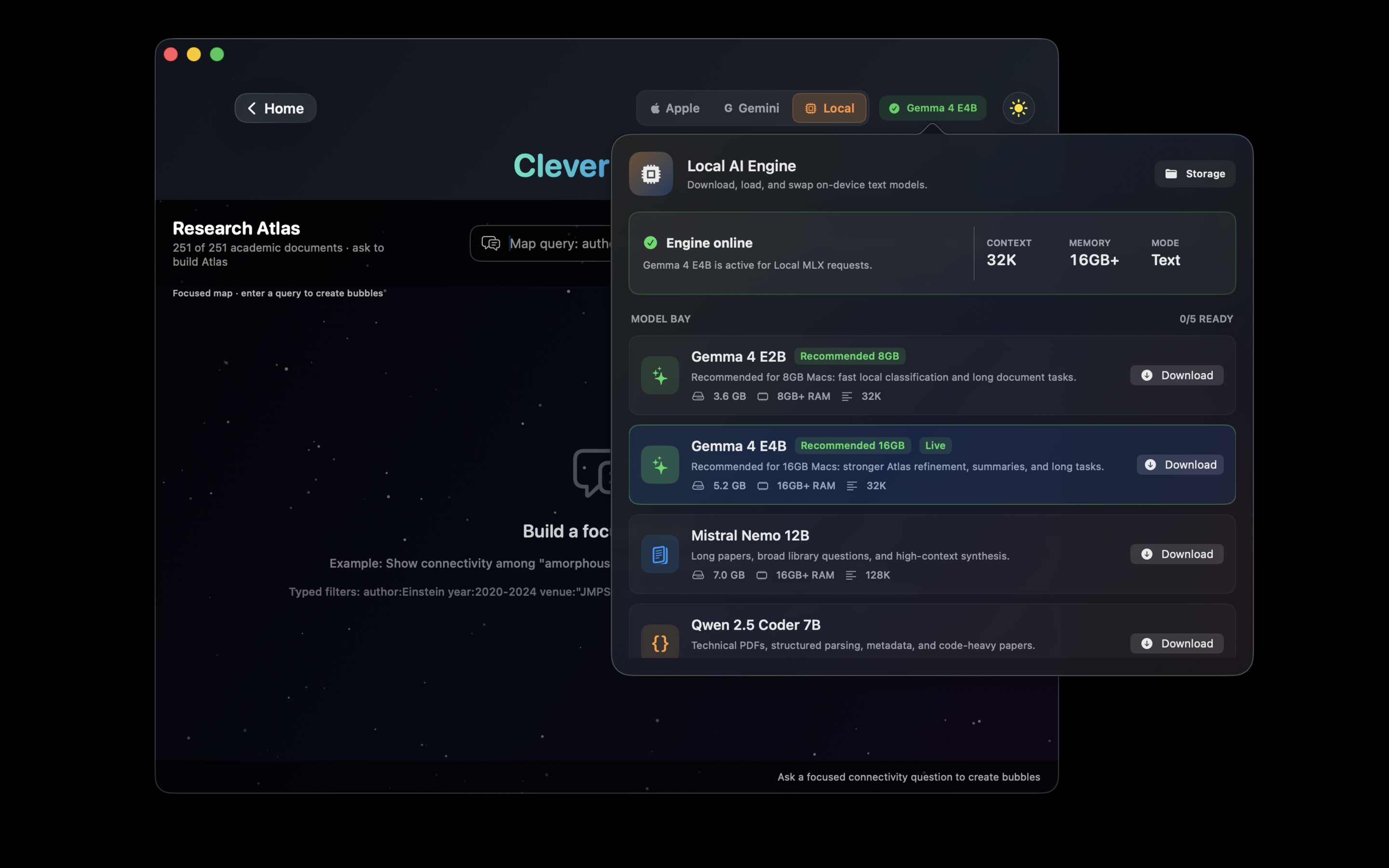
Choose the right private model for each workflow, including Apple Intelligence, Gemma, Mistral, and other downloaded MLX models running directly on your Mac.
Switch instantly between papers, preprints, theses, textbooks, and identified document types.
Sparse MoE reasoning model for long-context drafting, research synthesis, and heavier local analysis.
Updated local runtime with newer model support, Hugging Face loading, and improved Apple Silicon compatibility.
High-speed intelligence with native 128K context window.
Google's latest model in an OptiQ-quantised build — tuned for lower-memory Macs with fast classification and long-document tasks.
Stronger OptiQ-quantised Gemma 4 variant for deeper summaries, long tasks, and research synthesis.
Precision parsing for technical PDFs, code-heavy papers, and structured document conversion.
Unified Metal packaging, optimized builds, Qwen warm-up, and thinking-output guards reduce first-answer loops and model loading issues.
Turn your academic library into an interactive map of papers, authors, years, journals, and research themes. Ask focused questions and see the relationships hidden inside a normal file list.
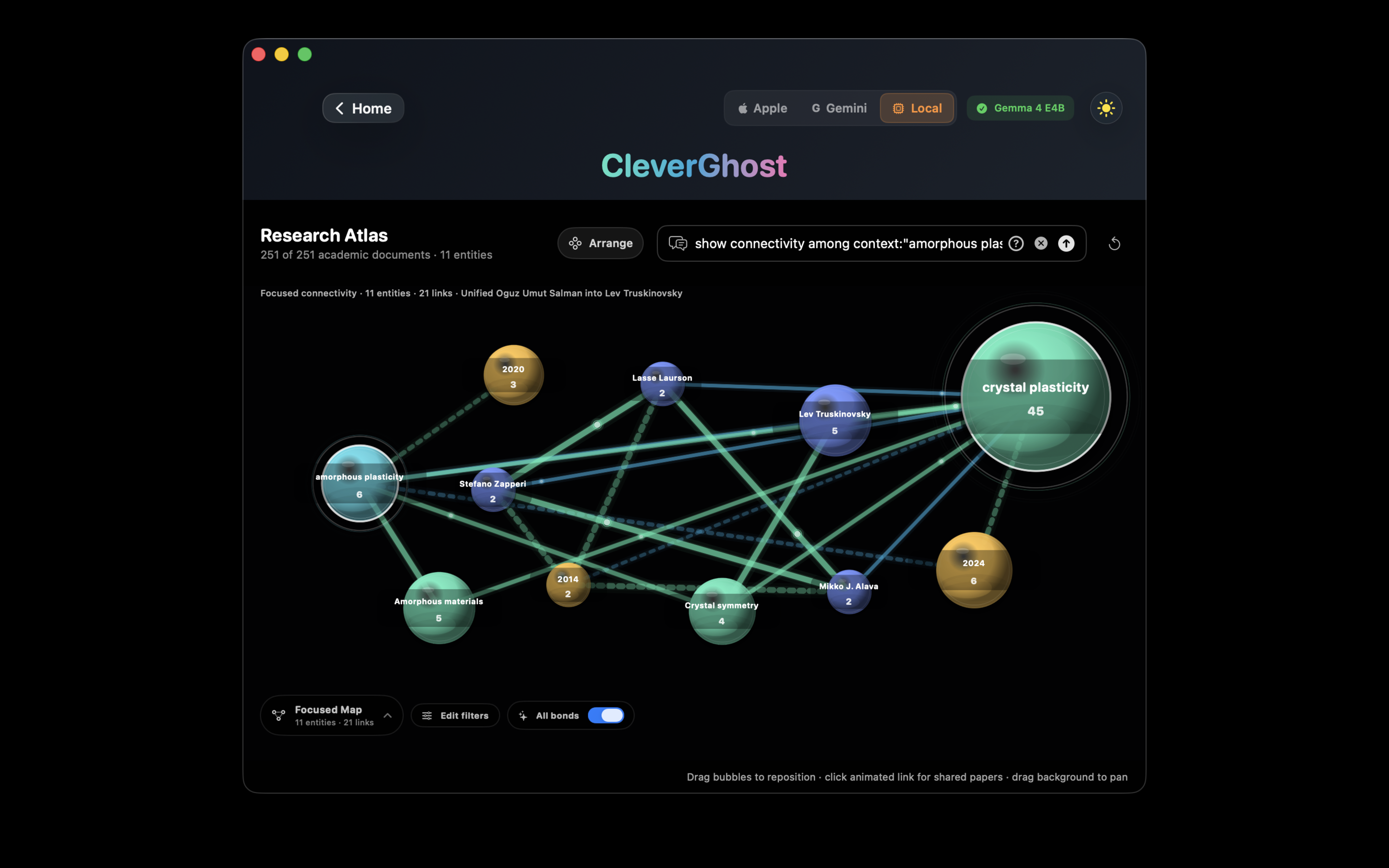
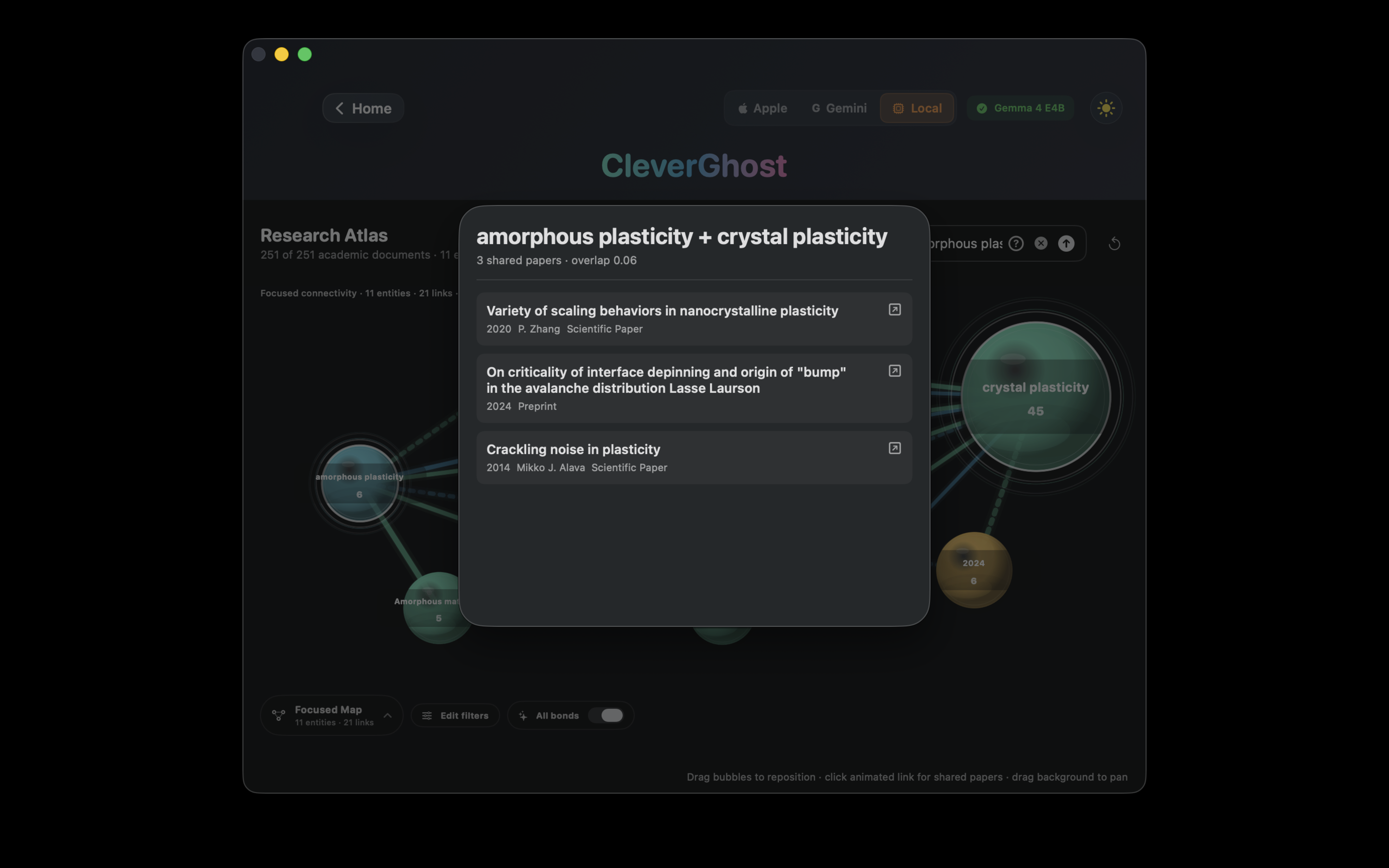
Papers, preprints, and books appear as nodes. Edges are weighted by topic and citation overlap — the stronger the link, the thicker the bond.
Ask "Show connectivity among amorphous plasticity" and the atlas instantly filters to the relevant cluster of documents and authors.
Find venues by full name, standard abbreviation, or a clear acronym. Ambiguous acronyms are never used to combine unrelated journals.
Tap a link between two nodes to instantly see the papers they share — with title, year, and category shown in a clean popup.
Graph construction and all semantic analysis run locally. No document content is transmitted externally.
Never pay for Grammarly again thanks to CleverGhost.
A private, on-device AI writing workspace for all your text. Paste or type anything, extract writing from PDFs with vision AI, then improve grammar, clarity, tone, and scientific equations in one focused editor—with zero monthly subscriptions.
Use Grammar Studio like a complete writing assistant. Paste text directly or extract a PDF page with the local Qwen3-VL vision model.
Fix grammar, make writing clearer, adjust academic tone, or rewrite a selected passage. Review changes before accepting them.
Switch between British and American English, preserve LaTeX equations, and keep your writing private on your Mac.
Powered by Apple's FoundationModels API, CleverGhost brings powerful on-device intelligence to your documents—completely private and offline.
Ask questions about your documents. Get instant, context-aware answers powered by on-device AI. Works offline.
Advanced grammar analysis with structured output. Select specific pages (1-5, 1,3,5) and get detailed corrections with explanations.
Compare and synthesize information across multiple research papers. Cross-reference sources automatically.
AI reads entire bibliographies from papers & theses. Extracts every reference with DOI/arXiv verification via CrossRef. Exports clean BibTeX instantly.
See how it works ↓Generate professional academic cover letters for journal submissions. AI reads your abstract and creates tailored letters.
Search your Smart Library and arXiv by topic, load more results, and add useful papers directly to your library.
🔒 Private AI Choices: Use Apple Intelligence or downloaded MLX models locally on your Mac, with Gemini 3.5 Flash-Lite available as an optional cloud boost. You choose the engine for each workflow.
An optional cloud boost alongside Apple Intelligence and local MLX models — bring your free Google AI Studio key and unlock a 1 million-token context window. Your privacy philosophy, your choice.
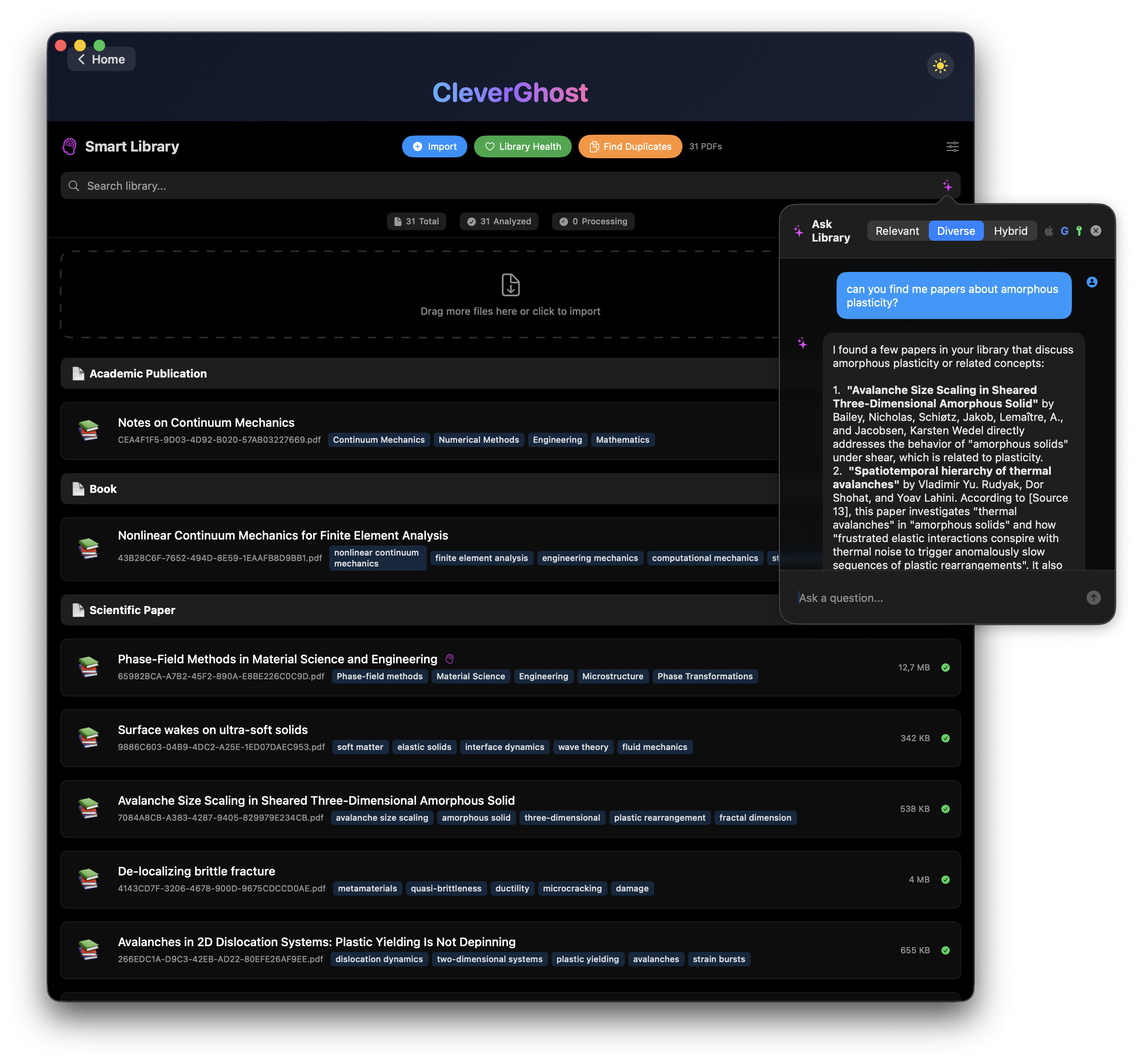
Chat with your entire research library in natural language. Ask "Find all papers on transformers from 2022" or "Who published the most on this topic?" Gemini's million-token context scans hundreds of papers at once — your personal research librarian.
Summaries that read the whole paper, not just the first 3 pages. Bibliography extraction in a single call. Q&A with conversation memory — ask follow-up questions naturally.
Gemini 3.5 Flash-Lite is available through Google AI Studio. Get your key in two clicks, paste it into CleverGhost, and use Gemini as an optional cloud AI provider inside your CleverGhost Pro workflow.
Everything runs locally via Apple's FoundationModels API — zero network calls, zero data leaving your Mac. This remains the default for all users. No API key, no setup, completely private.
You choose to enable it. Your text is sent to Google's API using your own key, governed by Google's terms. Switch back to Apple AI at any time — one tap in the panel header.
Drop any scientific paper, thesis, or dissertation — CleverGhost reads the full bibliography and extracts every reference into clean, verified BibTeX in seconds.
Even scanned theses and papers with broken font encodings are no obstacle.
CleverGhost uses Apple Vision (VNRecognizeTextRequest) for pixel-level
text recognition — with accurate mode and language correction enabled — so every
reference is captured regardless of the PDF's quality.
Hybrid mode cross-checks every extracted reference against six scholarly APIs in a fallback chain, filling in missing fields and confirming DOIs for maximum accuracy.
Copy a complete .bib file to clipboard or save to disk.
Ready to paste into LaTeX, Overleaf, Zotero, Mendeley, or BibDesk instantly.
Drop your PDF
Paper, thesis, or dissertation — any format accepted
Choose mode
Offline (pure AI), Online (API lookup), or Hybrid
AI extracts every reference
Parallel TaskGroup processing — entire thesis in seconds
Export & rename
BibTeX copied + files auto-renamed from metadata
Drop in research papers, books, contracts, invoices, IDs, medical documents, and more. CleverGhost reads the details, identifies each document, organizes the library, and keeps recent imports easy to find. For academic PDFs, it gives you the library control people expect from tools like Zotero or Paperpile, with local AI workflows built in.
Instantly sorts documents into meaningful categories — Financial, Medical, Academic, Legal, and more — using on-device intelligence.
The most comprehensive pipeline on macOS
Level 1
RAG Semantic Match
Compares meaning, not bytes
Level 2
Hash Match
Exact byte-for-byte identity
Level 3
Content Fingerprint
Normalised text comparison
Level 4
Title Similarity
Fuzzy rename-resistant matching
100% on-device. No cloud indexing, no uploads. Your documents never leave your Mac.
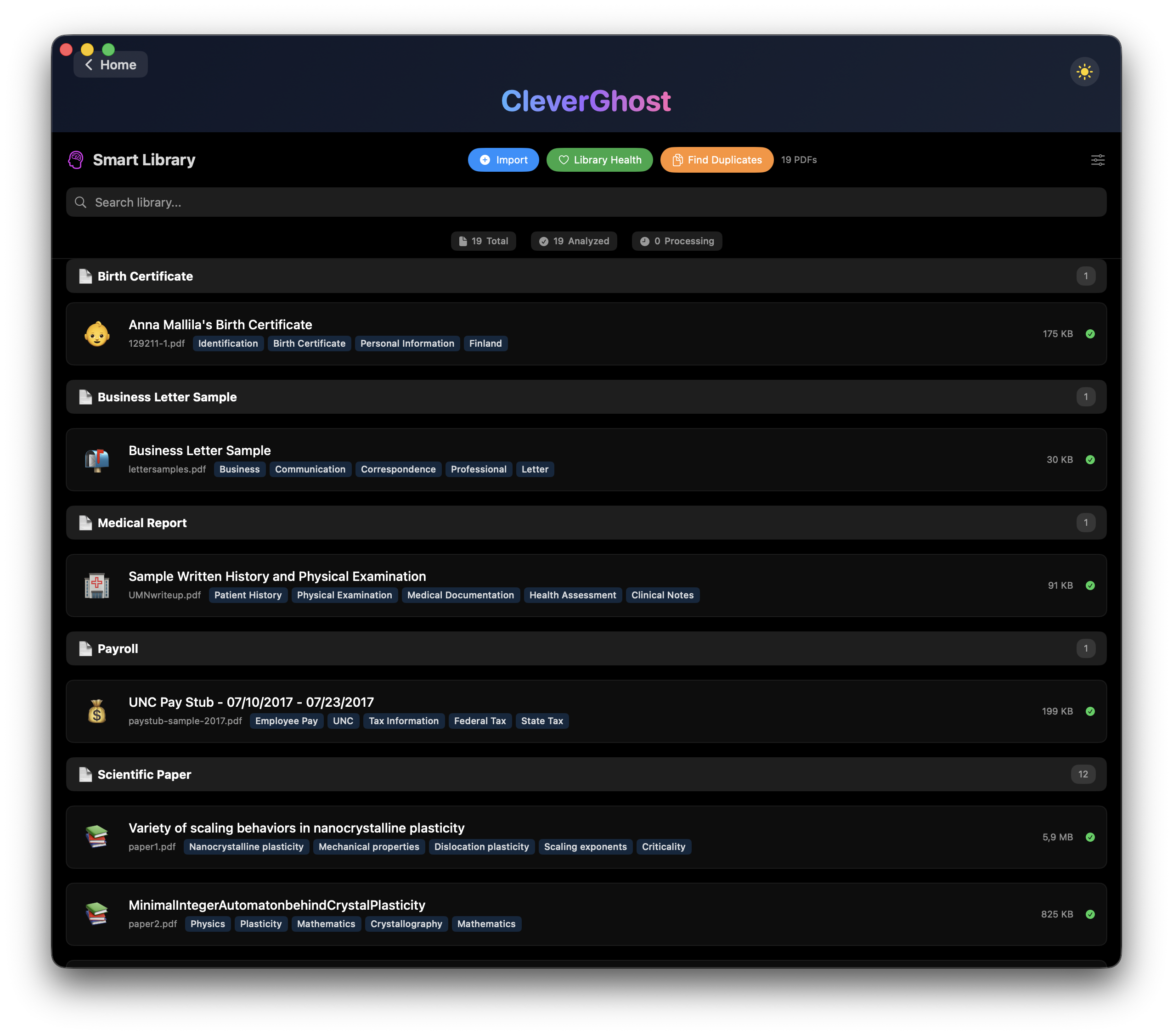
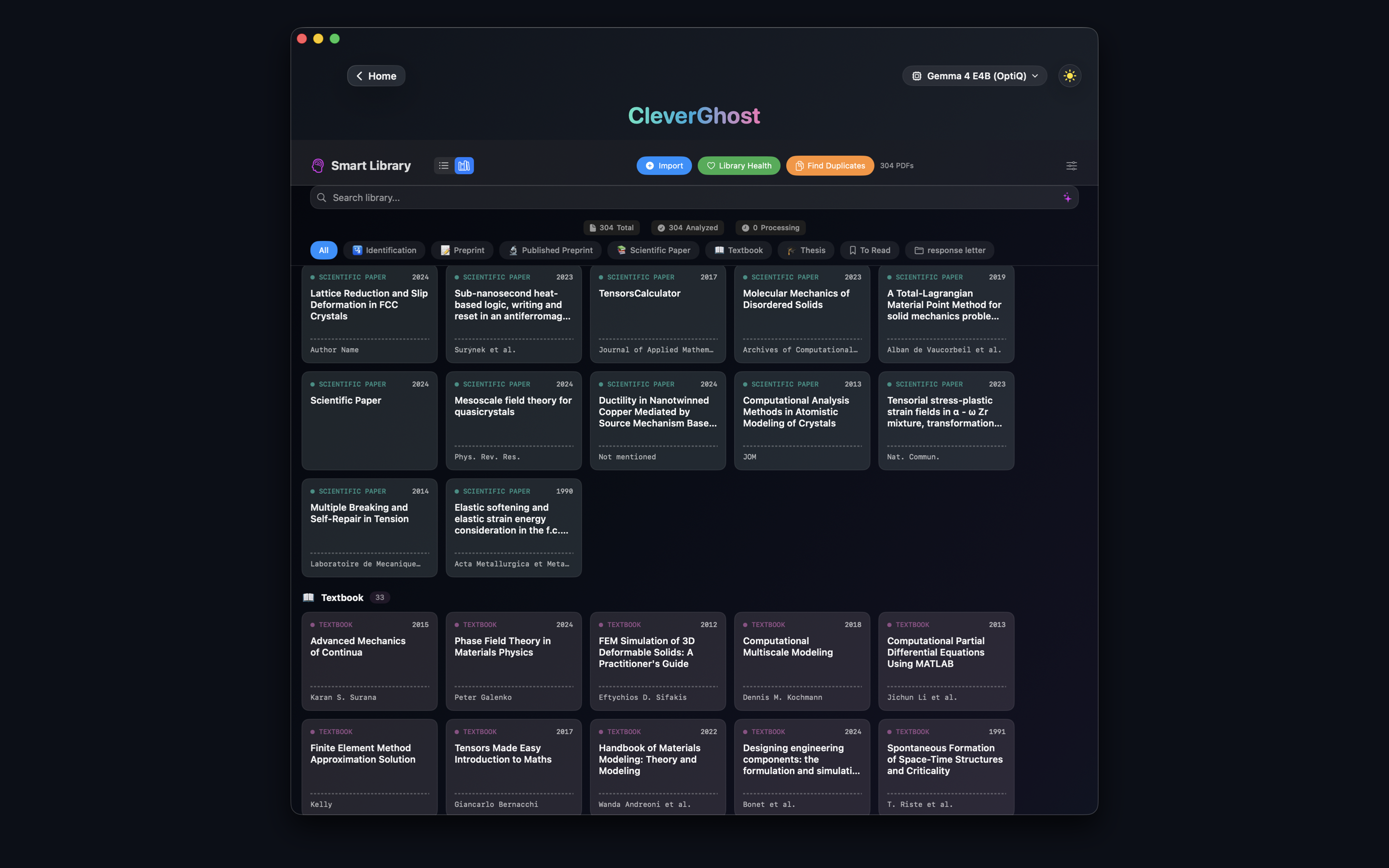
Browse hundreds of documents at a glance with searchable drawers, document categories, metadata, and a fast grid view designed for research libraries.
A modern, intelligent reference manager built right into CleverGhost — a BibDesk-style BibTeX library with AI extraction, verification, search, tags, and export. Extract once, keep forever.
Extract references
Drop a paper, run extraction
Send to BibGhost
One click — saved locally forever
Manage your library
Search, tag, export, cite
References saved forever in a private SwiftData store on your Mac. No cloud database, no sync service required.
Right-click any row to instantly copy \cite{key}, full BibTeX record, minimal BibTeX, or
RIS format.
Search across title, authors, abstract, and notes simultaneously. Colour labels for fast visual triage.
See BibGhost in action
Watch CleverGhost in Action
BibTeX extraction • Smart Library • Reference management
CleverGhost brings industrial-grade AI to your personal records. Manage your family's IDs, passports, utility bills, and medical files with the same intelligence used for research—all private and on-device.
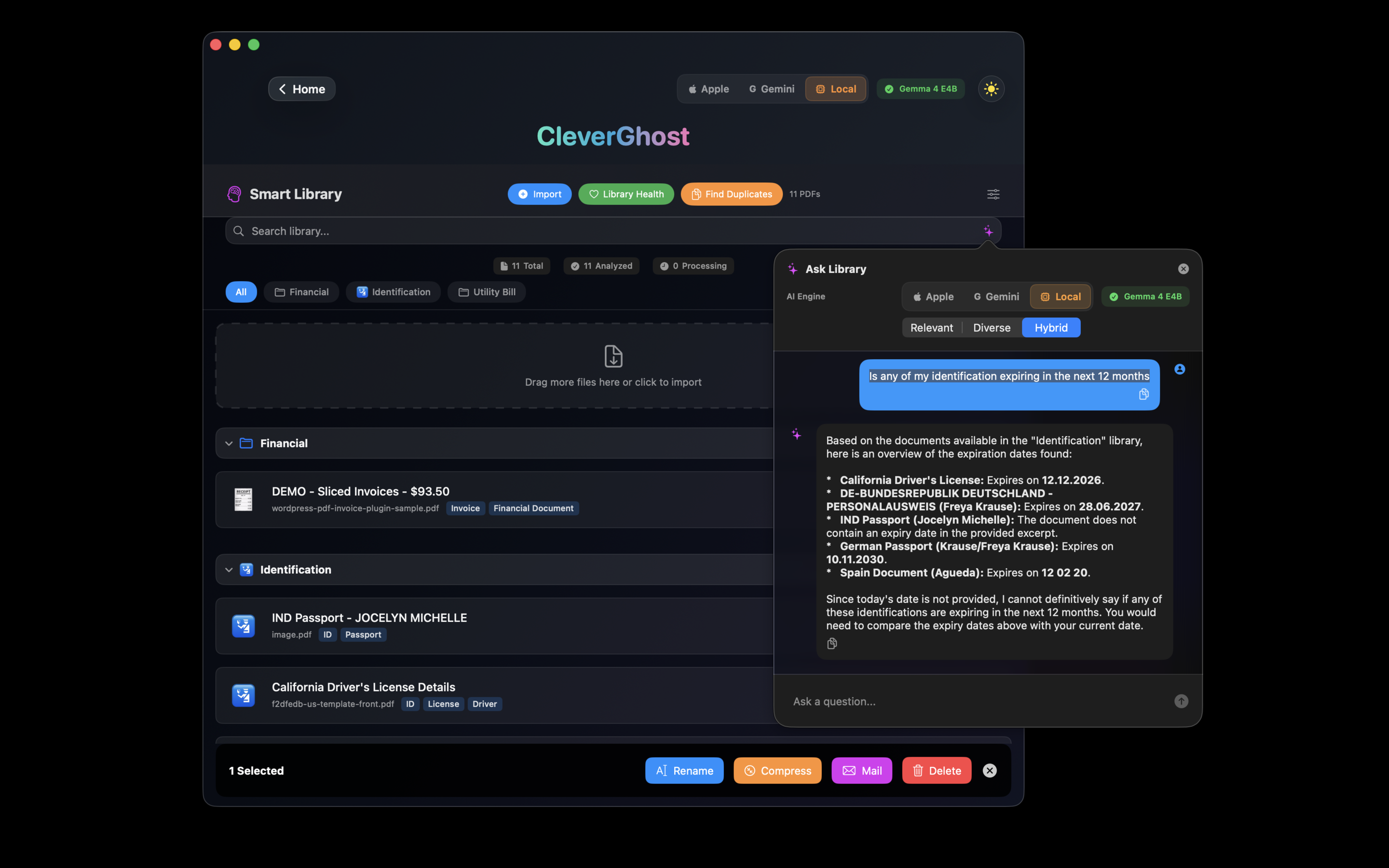
AI automatically extracts document numbers, expiry dates, and nationalities. Ask "Is any of my identification expiring in the next 12 months?" and get instant, tabulated answers from your whole library.
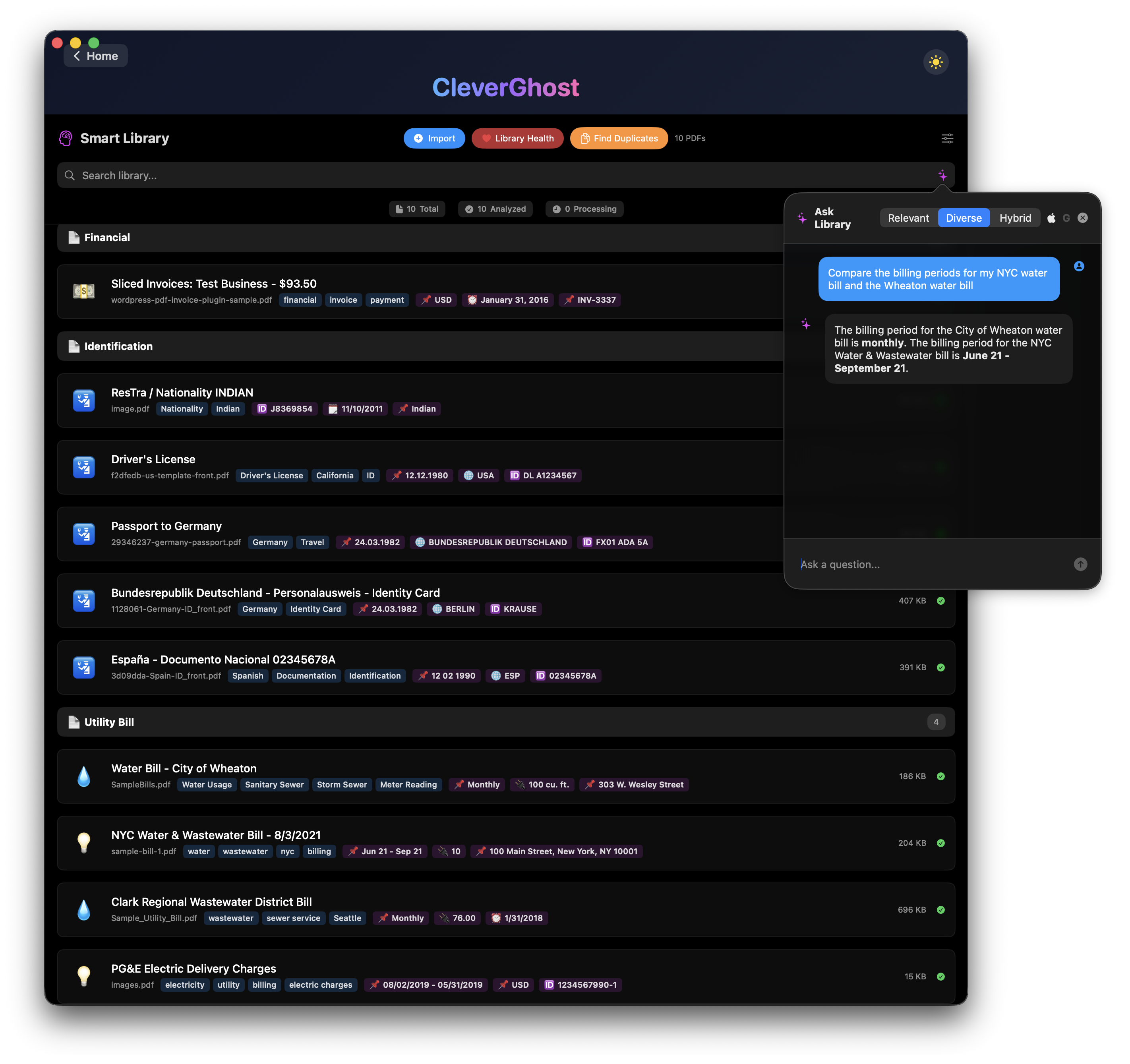
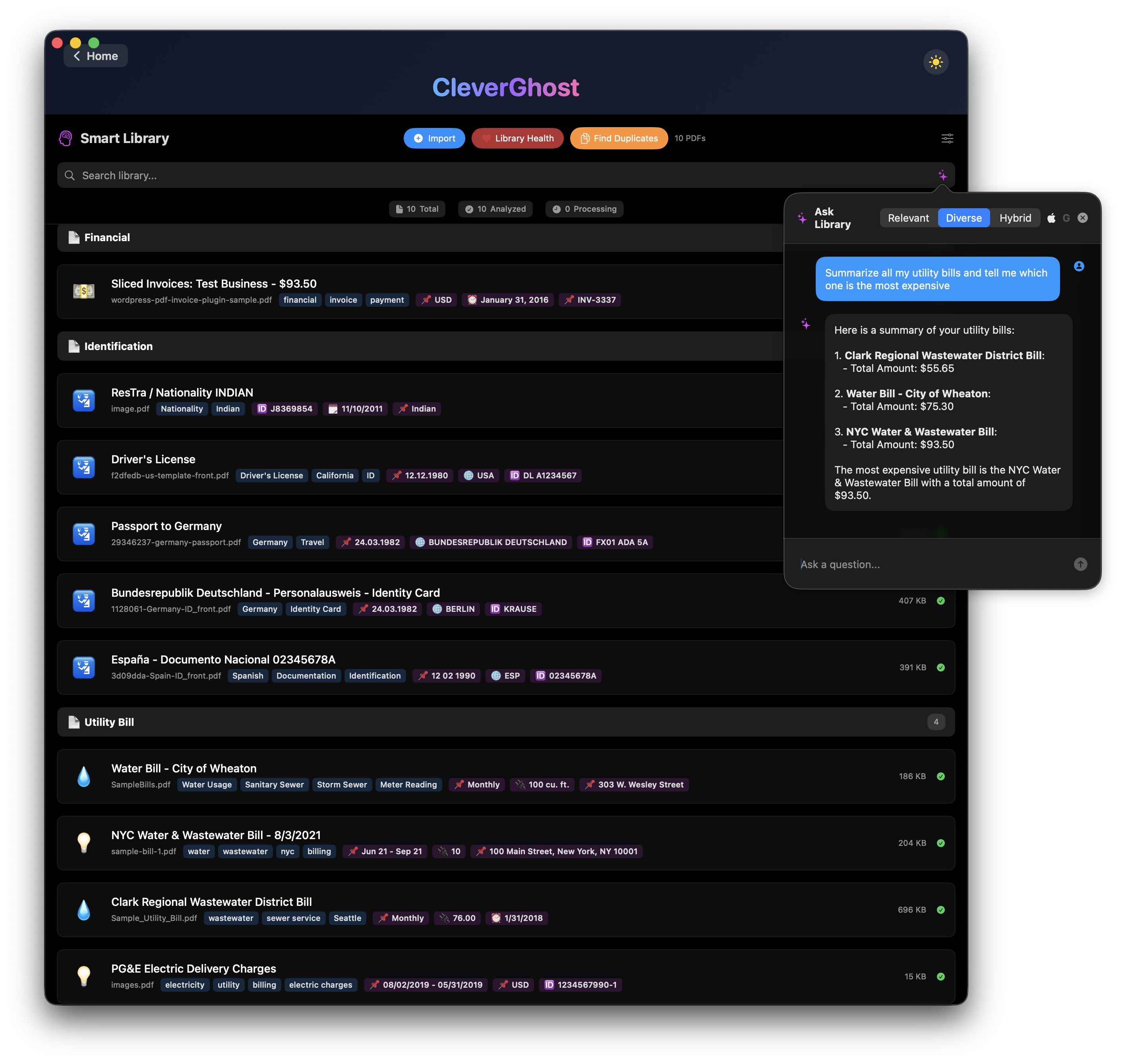
Draft enquiry emails to service providers, find account numbers instantly, or compare usage across vendors. Smart Library categorizes everything into clear folders automatically.
Sensitive medical records and legal contracts never leave your Mac. Our On-Device AI processes your most private data without ever talking to a server.
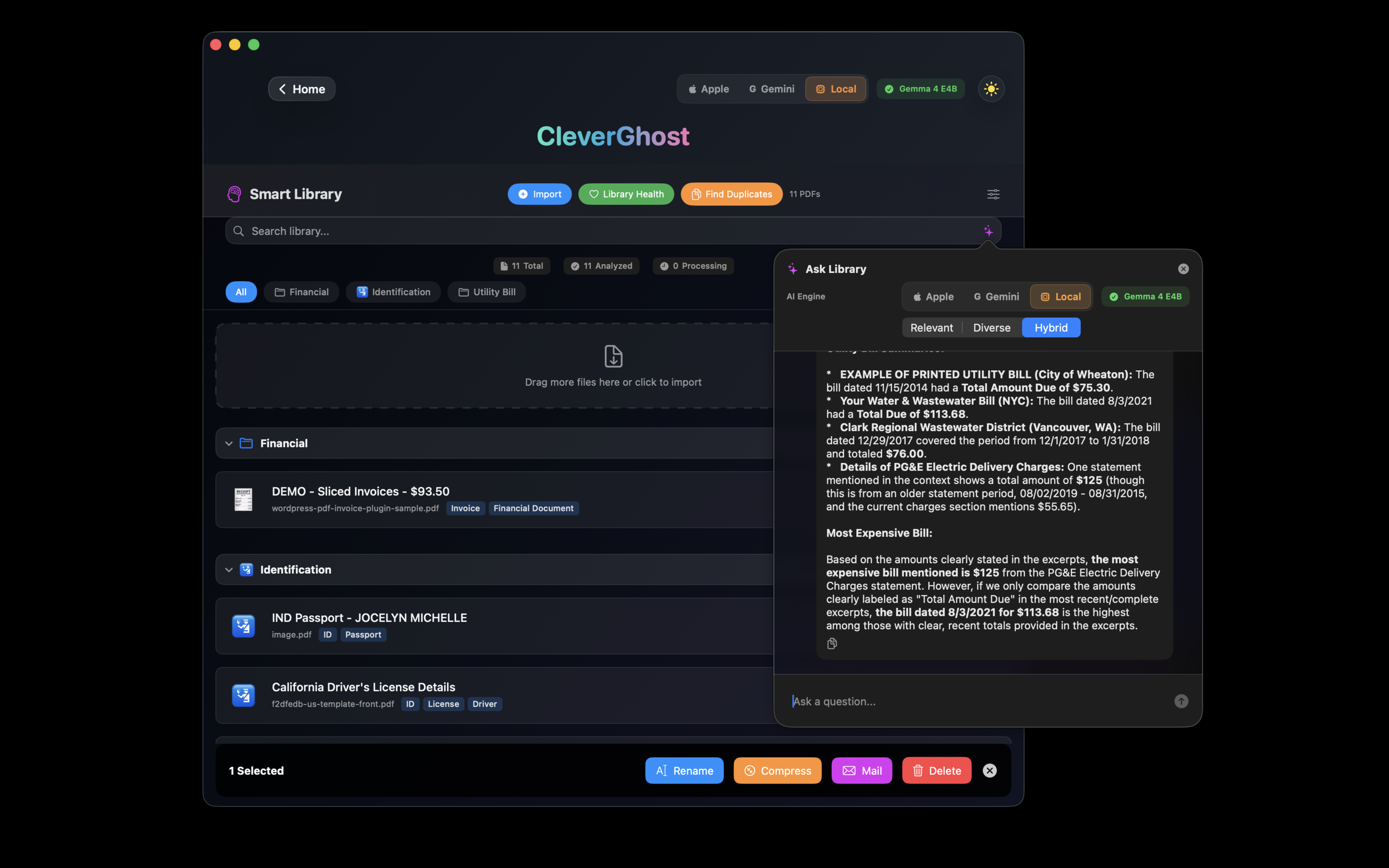
Ask Library
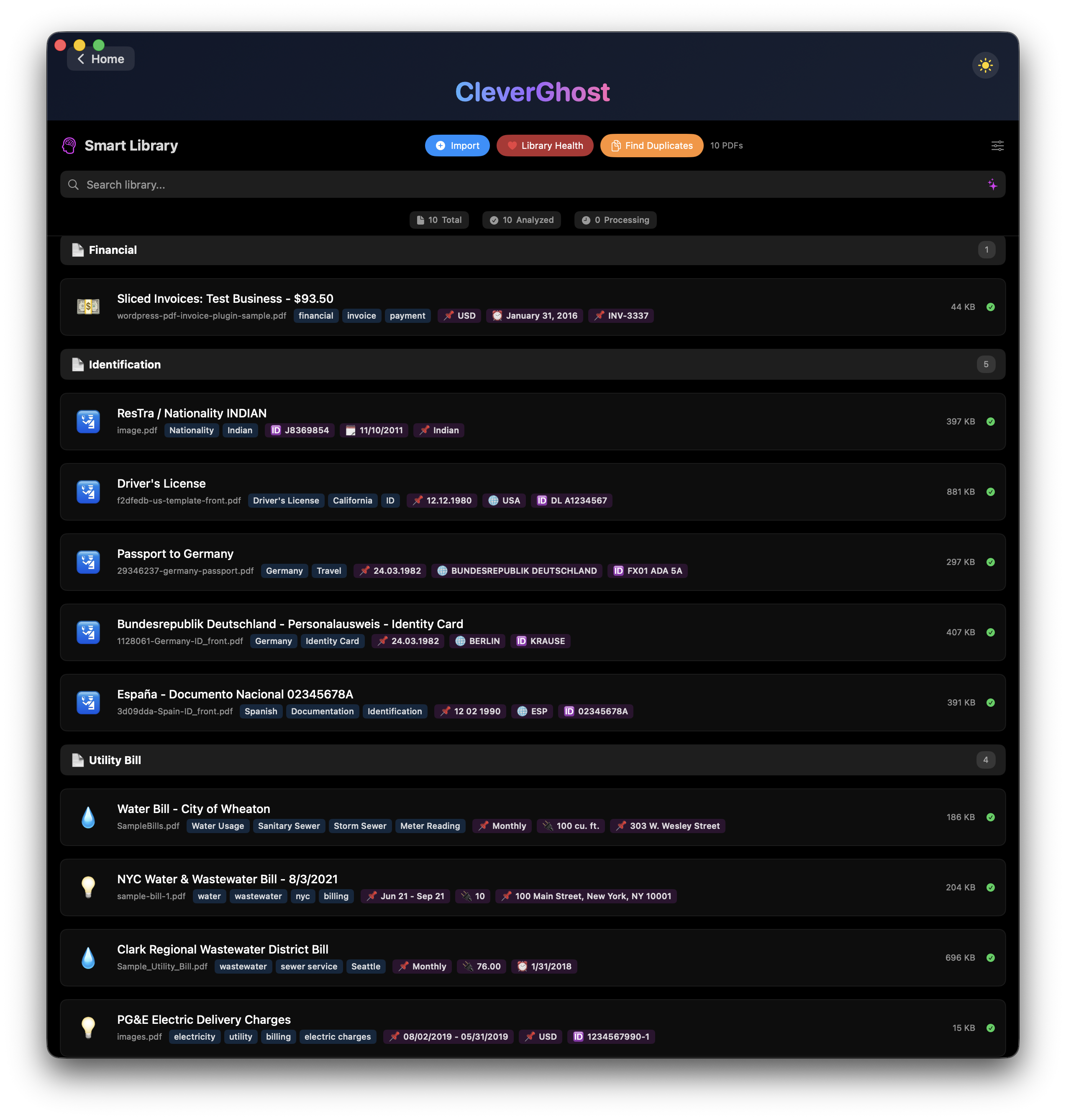
Smart Sorting
Deep Metadata
Document Library
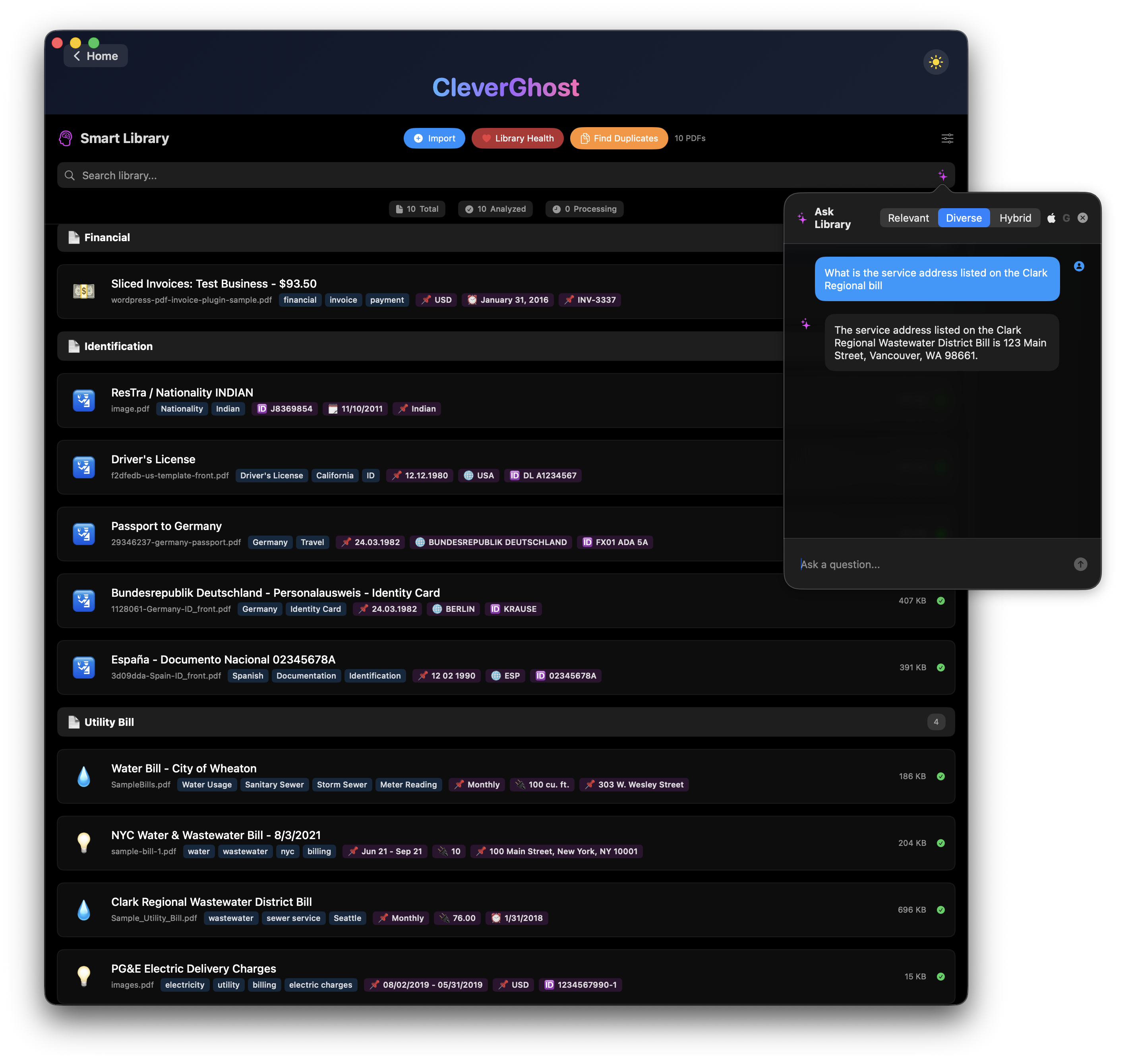
Instant Retrieval
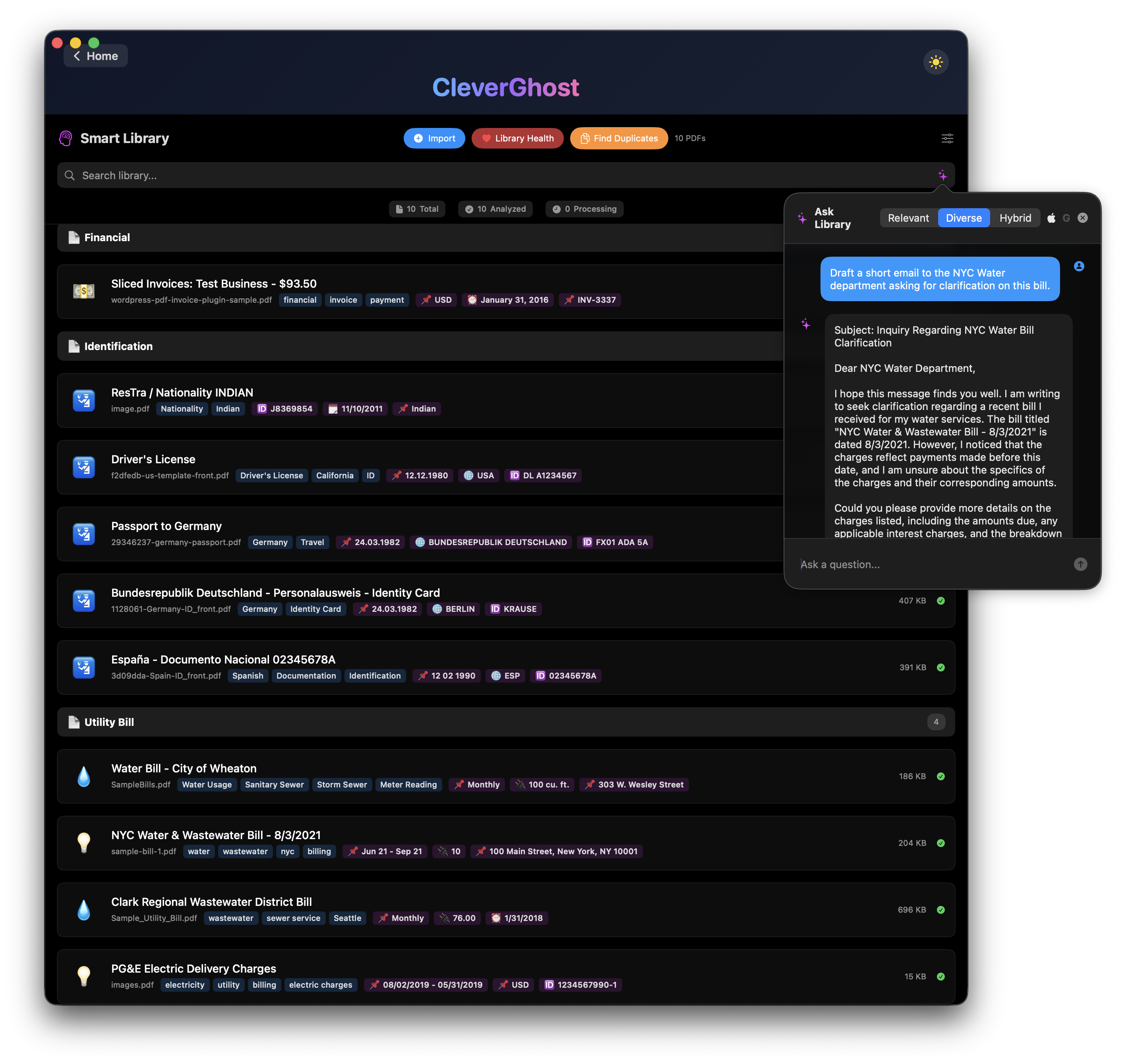
AI Email Drafting
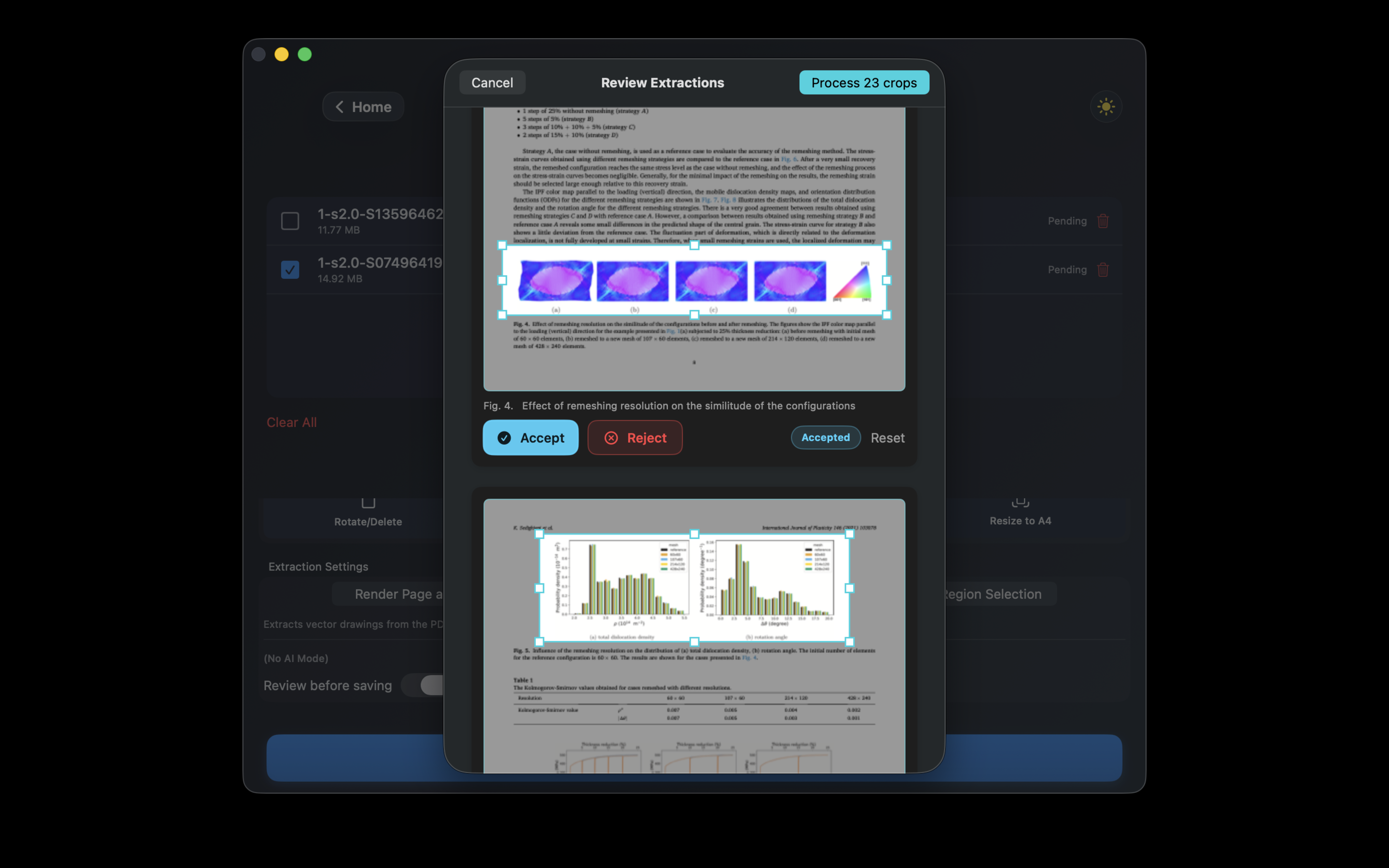
Pull images and figures out of any PDF — embedded bitmaps in one click, vectorial graphics with a smart crop review that puts you in control.
Extract all bitmap images embedded inside a PDF — photos, scans, illustrations — in a single action. High reliability, no quality loss.
A new proprietary algorithm detects charts, diagrams, and figures drawn as vector paths inside the PDF — content that isn't stored as an image at all.
Since automatic boundary detection is ~90% accurate, the algorithm proposes bounding boxes that you review, adjust, accept, or discard — ensuring clean results every time.
All extraction runs on your Mac. No document content is transmitted externally.
Whether you're a researcher, student, or professional, CleverGhost adapts to your workflow.
For researchers and students analyzing documents
Drop multiple research papers and ask CleverGhost to synthesize findings across all documents. The AI identifies contributions from each paper and provides a comprehensive analysis with source attribution and contribution tracking.
Perfect for: Literature reviews, thesis research, studying, fact-checking, academic writing
For academics, PhD students & thesis writers — see full extraction details ↑
Drop PDFs and let AI extract full bibliographic metadata — works with DOI and arXiv IDs, papers, theses, and chapters.
Combine AI extraction with a 7-source fallback chain — CrossRef, arXiv, OpenAlex, Semantic Scholar, HAL, Google Books & OpenLibrary — for maximum accuracy.
Clean, normalise, and format citations. APA, MLA, Chicago, Harvard, IEEE — all supported.
Drag & Drop PDFs
Select multiple research papers or a whole thesis
Choose Extraction Mode
Hybrid, Online, or fully Offline
AI Extracts Metadata
Author, title, journal, year, DOI — all fields
Export BibTeX
Ready for LaTeX, Overleaf, Zotero, Mendeley
Automatically rename files using extracted metadata:
Smith_2024_DeepLearning.pdf
Generate professional journal submission letters. AI reads your abstract and creates tailored content.
Perfect for: Building bibliographies, managing citations, thesis reference lists, academic publishing, literature organisation — exports BibTeX, APA, MLA, Chicago, Harvard, IEEE
For professionals managing documents
Basic Mode
One-click presets: Screen, eBook, Printer, Prepress
Pro Mode
Custom DPI, image quality, color management, font optimization
Merge & Split
Combine multiple PDFs or extract specific pages
Rotate & Reorder
Drag-and-drop page manipulation
PDF Repair
Rasterize Pages
Resize to A4
Perfect for: Document preparation, file optimization, security, batch processing
Built with cutting-edge technology
Leverages macOS 26.0 (Tahoe) on-device AI with structured output using @Generable structs.
Temperature control, automatic retry logic, and smart context window management.
Next-generation text extraction powered by Apple's native Vision framework — lightning-fast and significantly more accurate, especially on scientific papers with complex layouts or garbled fonts.
Requirements: macOS 26.0 Tahoe or later • Apple Silicon recommended for downloadable local MLX models
CleverGhost was built from the ground up to respect your data. Your research, documents, and conversations stay on your Mac when you use Apple Intelligence or local MLX models.
Run private workflows with Apple Intelligence or downloaded MLX models.
We don't track your usage or collect any personal information.
CleverGhost is built on Apple-native frameworks with optional local MLX models. No telemetry, no document collection. Your documents stay on your Mac unless you choose an external provider.
Whether you've found a bug, have a feature request, or just need guidance, email support with a few details and we will help you sort it out.
Your PDF files are always safe — they are stored on disk and are never touched by a reset.
What gets wiped is all the metadata the AI extracted: titles, authors,
categories, tags, summaries, and the search index (RAG chunks). After a reset you will need
to re-drop your PDFs into the Smart Library so CleverGhost can re-analyse them.
We recommend exporting your BibGhost library to a .bib file first as a backup.
Only as a last resort — for example if the app shows a "database error" message, the Smart Library hangs indefinitely during ingestion, or the library fails to load after an update. For everyday slowness or a single stuck file, force-quitting and relaunching the app is usually enough.
This can happen to documents that were left mid-index when the app was quit or relaunched before indexing completed — most often older or large scanned PDFs that take longer to process. The fix is simple: select the affected document in the Smart Library and choose Re-analyze. This rebuilds its search index from scratch and clears the stuck state. Your PDF and its file are never affected. There's no need to reset the whole database — re-analyzing the single document is enough.
● Orange/red: the document uses an older embedding index.
↻ Blue arrow: click it to rebuild that document's AI index.
● Green: document analysis completed successfully.
You can keep working normally with an older index. If a document does not return the answers you expect, rebuild only that document's AI index for the latest retrieval quality.
Start with a 1-month Pro trial, continue for $12.99/year, or choose lifetime access for $39.99 once.
Annual Pro
$12.99 / year
1-month free trial for eligible users. Cancel anytime.
Lifetime Access
$39.99 once
One-time purchase. No subscription or renewal.